
proTES
A gateway for the GA4GH Task Execution Service (TES) API that federates your TES instances, brought to you by ELIXIR On-Cloud. Clients send their tasks to proTES as to any TES instance; proTES passes each task through a configurable pipeline of plugins (FOCA's gateway plugins), which pick the TES instance to run it on (or change the request), forwards it there and tracks its state. By default, tasks go to a random TES instance, for load balancing, without third-party location lookups; plugins (e.g., the routing plugins of foca-plugins, which the image contains) route tasks to the TES instance closest to their input data (an opt-in, as it uses lookup services), or serve access control, request processing or validation, or the selection of instances by data use restrictions and client preferences. Run it with Docker Compose or deploy it to Kubernetes with its Helm chart.
Known deployments
None listed yet.
Running proTES yourself? Open a pull request that adds your deployment
(URL, operator and notes) to this section of
README.md.
Contents
- Getting started: run proTES with Docker Compose and send the first requests.
- Configuration: the base config, overlays, the TES instances, the plugins, the task settings, the request size limit, the server and the service info.
- API: the endpoints, how tasks are forwarded, and errors.
- Plugins: the plugin pipelines that process new tasks, and how to install and enable plugins.
- Access control: authentication, roles, task ownership, the permissions API and credentials of TES instances.
- Deployment: the Helm chart for Kubernetes.
- Operations: the Celery workers, Flower, logs, the owners of tasks, and verifying images and charts.
- Upgrading: changes to existing deployments and data.
- Development: development setup, checks, documentation, versioning and releases.
- Contributing: how to contribute, the code of conduct, pull requests, commit messages and the Python guidelines.
- API reference: the code, generated from its docstrings.
- Changelog: release notes.
Architecture
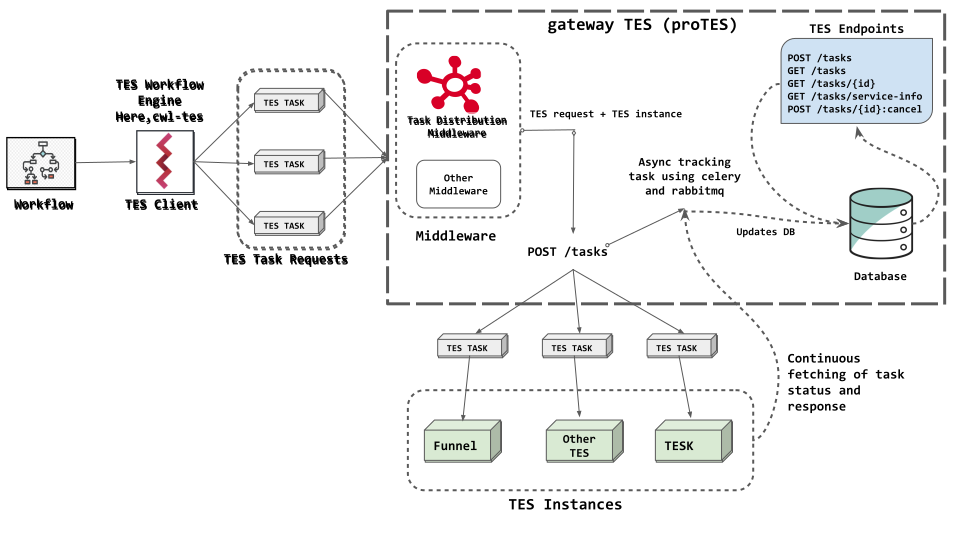
proTES provides central features to a federated network of independently operated TES instances: it can serve, for example, as a compatibility layer, a load balancer, a public entry point to an enclave of independent compute nodes, or a means of collecting telemetry.
When proTES receives a task, it runs the configured pipeline of plugins before forwarding the task to a TES instance of the network. Plugins (FOCA's gateway plugins, shared with other gateways) serve specific requirements, such as access control, request or response processing or validation, or the selection of suitable TES instances considering data use restrictions and client preferences. By default, tasks go to a random TES instance, for load balancing, with the routing plugin of foca-plugins that the image contains, without third-party location lookups. Routing to the TES instances closest to the input data of a task, to bring compute to the data, is an opt-in (see Plugins): it locates inputs with lookup services, or with a GeoIP database that you provide.
proTES is a Flask app built with FOCA, configured declaratively in YAML. It stores incoming and forwarded tasks in a MongoDB database. Forwarded tasks are tracked asynchronously by Celery workers, which can be scaled up, via a RabbitMQ broker. A Helm chart and a Docker Compose setup are provided for deployments on Kubernetes and for development, respectively.
Citation
If you use proTES, please cite it with its DOI
10.5281/zenodo.23619646, which
always resolves to the latest version on Zenodo; the
Zenodo record lists the DOI of each version, too. The citation metadata is in
CITATION.cff:
on GitHub, "Cite this repository" in the sidebar of the repository formats it
as APA or BibTeX.
License
This project is covered by the Apache License 2.0 also shipped with this repository.
Contact
The project is a collaborative effort under the umbrella of ELIXIR On-Cloud. Follow the link to get in touch with us via chat or email. Please mention the name of this service for any inquiry, proposal, question etc.